
Dnevend / daily-stoic-printer
斯多葛打印机
README
斯多葛打印机
每天早上 9 点,自动抓取当天最新一篇英文文章(默认 Daily Stoic 的每日冥想), 排版成 80mm 热敏小票打印出来:封面 → 正文 → 中文译文 → 生词表(含中文释义), 用于英语学习和雅思备考。
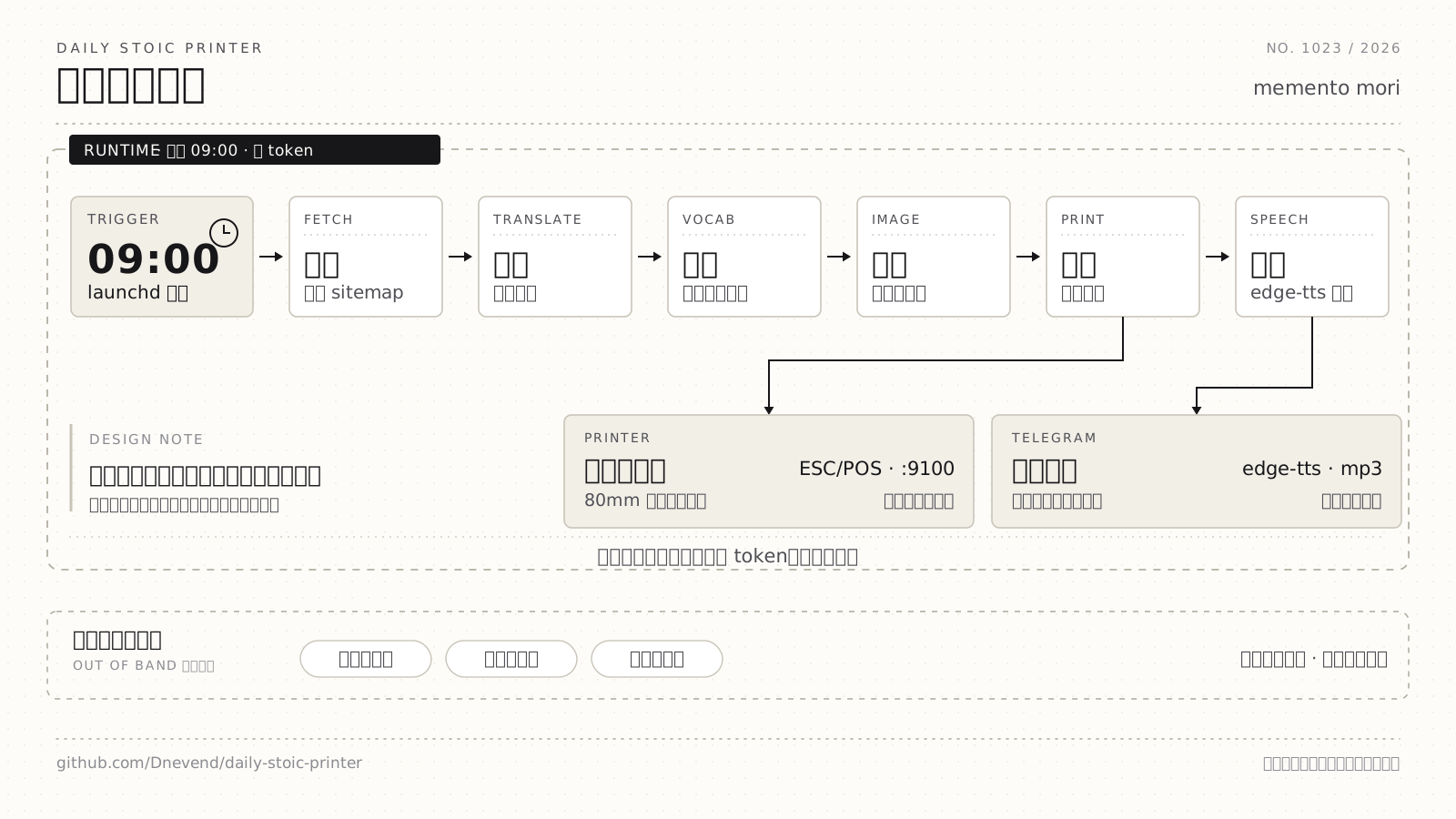
图中就是每天 09:00 跑的这条流水线:全程走确定性接口(免费翻译、词频表 + 离线词典、图库搜图), 不花 token。为什么这么设计、路上踩了哪些坑,写在博文《斯多葛打印机》里。
================================================
                 DAILY ENGLISH
                    2026-10-17
================================================

           Let Each Sphere Come First

------------------------------------------------
      [ 封面图(来自 Wikimedia Commons) ]
credit: sailko / CC BY 2.5 / Wikimedia Commons
------------------------------------------------

Think about how rarely we give ourselves fully
to whatever we're doing. ...          ← 正文(英文)

------------------------------------------------
TRANSLATION  (中文译文)
------------------------------------------------
想想我们很少会全身心地投入到我们正在做的事情中。…  ← 译文

------------------------------------------------
TODAY'S WORDS
------------------------------------------------
1. errands                                ← 生词
   n. 任务, 差使, 使命                      ← 中文释义
   Working, some part of us is thinking    ← 原文例句
   about the errands we need to run later
   or the conversation we had the other day.
...
================================================
source: https://dailystoic.com/let-each-sphere-come-first/
printed: 2026-10-18 09:00
================================================不确定效果的话,不用打印机也能看:见下面的「预览」一节。
特性
| 特性 | 说明 |
|---|---|
| 多来源 | 内置 Daily Stoic 抓取器 + 通用 RSS/Atom;加来源 = 一个类或一段配置 |
| 封面图 | 从外部图源取一张当封面(默认 Wikimedia Commons 按关键词搜,公版/CC,打印作者与许可) |
| 正文配图 | 打印正文配图,自动跳过链到商店/推广页的图 |
| 中文译文 | 自动翻译正文(MyMemory,失败切 Google),按段落缓存,重跑不重复请求 |
| 生词表 | 按词频挑「超出你词汇量」的词(含词形还原),配原文例句 + 中文释义(本地 ECDICT 词典) |
| 文章语音 | 用 edge-tts 神经音色把英文正文读成语音,自动发到 Telegram;失败降级 macOS say |
| 推广过滤 | 自动剔除书籍/周边推广段(CTA、"while supplies last" 之类),但正文里引用书籍的段落会保留 |
| 长文保护 | 正文超过 max_words(默认 900 词)时截断,存档仍是全文 |
| 中英混排排版 | 按显示宽度换行(中文算 2 列),中文走 GB18030 中文模式 |
| 两种打印机接入 | 网络 9100 端口直发(免驱动)/ CUPS 队列(USB) |
| 带图预览 | 生成热敏纸模拟 PNG(含 1bit 抖动)或网页,不用打印机就能看 |
| 可测试 | 纯函数排版 + 114 个 pytest(不联网、不用打印机) |
安装
git clone git@github.com:Dnevend/daily-stoic-printer.git
cd daily-stoic-printer

uv venv
uv pip install -e ".[dev]"              # 或 make install
# 要打印封面/配图(需要 Pillow):
uv pip install -e ".[dev,images]"

.venv/bin/dailyprint build-data         # 首次:下载高频词表 + 英汉词典到 data/
运行时不需要第三方库,只有「打印图片」用到可选的 Pillow。
快速开始
.venv/bin/dailyprint sources                    # 看有哪些来源
.venv/bin/dailyprint preview -o preview.png     # 抓最新一篇 + 排版成热敏模拟图(带图)
.venv/bin/dailyprint preview -o preview.txt     # 纯文本版(48 列,能 diff)
.venv/bin/dailyprint print --ip 192.168.1.50    # 真打
.venv/bin/dailyprint test-print --ip 192.168.1.50   # 打测试页(校准宽度/对齐/切纸)
命令一览
| 命令 | 作用 |
|---|---|
sources |
列出已配置来源与可用类型 |
build-data [--force] |
下载并构建词频表 / 词典 |
fetch [--count N] [--images] |
抓文章存 Markdown(可选把图片下到本地) |
preview [-o FILE] |
排版预览;后缀决定格式:.txt / .png(热敏模拟,带图)/ .html(网页,带图) |
print [--ip IP | --queue NAME] [--dry-run] [--no-audio] [--audio-voice VOICE] [--audio-engine auto|edge|say] [--audio-rate RATE] |
抓取 + 排版 + 发送;--dry-run 只排版留档不发送 |
audio [-o FILE] [--send] [--no-send] [--voice VOICE] [--engine auto|edge|say] [--rate RATE] [--say-voice VOICE] [--say-rate WPM] [--include-translation] [--max-words N] |
只生成语音(可选发送 Telegram) |
test-print [--ip IP | --queue NAME] |
发送测试页 |
通用参数:--source、--width、--words、--common、--max-words、--keep-promos、
--no-translation、--no-images、--no-cover、--no-vocab、--no-zh、--config、-v。
文章语音(TTS + Telegram)
每天 print 时,除打印外还会自动把英文正文合成语音,通过 OpenClaw 发到 Telegram:
.venv/bin/dailyprint print --ip 192.168.1.50          # 默认同时生成并发送语音
.venv/bin/dailyprint print --ip 192.168.1.50 --no-audio   # 今天不要语音
.venv/bin/dailyprint audio --send                      # 手动生成并发送一条
.venv/bin/dailyprint audio -o /path/to/out.ogg --no-send # 只生成文件- 默认使用
uvx edge-tts神经音色(如en-US-AriaNeural),音色自然;无需安装,uvx会自动从缓存/网络拉取edge-tts。 - 若
uvx/edge-tts不可用或联网失败,自动降级到 macOS 内置/usr/bin/say(音色Samantha,语速放慢到 160 wpm)。 - 若
/opt/homebrew/bin/ffmpeg存在,会转成 Telegram 语音条更喜欢的 OGG/Opus;否则直接保留 edge-tts 的 mp3 或 say 的 AIFF。 - 若
edge-tts/say、ffmpeg或openclaw任一缺失/失败,只记 warning,不会导致打印失败或返回非 0。 - 用于发送的语音先写到 OpenClaw 允许目录
~/.openclaw/workspace/.openclaw/tmp/dailyprint-audio/,发送成功后再归档一份到prints/audio/YYYY-MM-DD.ogg;两个目录均可由[audio]配置覆盖。
在 config.toml 里开关:
[audio]
enabled = true                   # print 时是否生成/发送语音
engine = "auto"                  # auto | edge | say;auto 优先 edge,失败降级 say
voice = "en-US-AriaNeural"       # edge-tts 神经音色(常见:en-US-JennyNeural / en-US-GuyNeural / en-GB-RyanNeural)
rate = "-10%"                    # edge-tts 语速;"0%" 原速,负值更慢
say_voice = "Samantha"           # 降级用 say 音色
say_rate = 160                   # 降级用 say 语速(词/分);默认 175 偏快
include_translation = false      # 是否连中文译文一起读
max_words = 0                    # 限制朗读词数(0 = 全文)
send = true                      # 是否通过 openclaw 发送
channel = "telegram"
target = "1419937886"
# send_dir = "/Users/you/.openclaw/workspace/.openclaw/tmp/dailyprint-audio"  # 发送用目录;空 = 默认允许目录
# archive_dir = "/Users/you/Music/dailyprint"                              # 留档目录;空 = prints/audio
配置
复制 config.example.toml 为 config.toml(config.toml 不入库):
[defaults]
source = "daily-stoic"

[render]
width = 48              # 每行列数(80mm Font A ≈ 48)
words = 8               # 生词条数
common = 6000           # 前 N 个高频词视为"已认识";调低=生词更多更简单
max_words = 900         # 打印时正文最多保留多少词(0 = 不限)
filter_promos = true    # 过滤推广/CTA 段落(打印用;存档保留原文)
translation = true      # 打印中文译文
images = "content"      # 正文配图:off | content(跳过推广图)| all
max_images = 2          # 最多几张配图
max_image_height = 400  # 位图最大高度(dots,越小越省纸)
chinese = true          # 打印机支持中文(不支持就设 false,会同时关掉译文)

[translation]
target = "zh-CN"
providers = ["mymemory", "google"]   # 按顺序尝试,失败自动换下一个
email = ""              # MyMemory 额度:匿名 5000 字符/天,填邮箱可到 50000

[cover]
source = "wikimedia"    # wikimedia | picsum | local | none
keywords = ["marcus aurelius bust", "seneca statue", "epictetus", "stoicism"]
# local_path = "/Users/you/Pictures/cover.jpg"   # source = "local" 时使用
width = 576
height = 320
credit = true           # 打印图片来源/许可(wikimedia 的图建议保留)

[printer]
kind = "network"        # network(网口,推荐)| cups
ip = "192.168.1.50"
port = 9100
# queue = "XP-80T"      # kind = "cups" 时填队列名

[audio]
enabled = true
voice = "Samantha"
include_translation = false
max_words = 0
send = true
channel = "telegram"
target = "1419937886"

[sources.daily-stoic]
type = "daily_stoic"
base_url = "https://dailystoic.com"优先级:内置默认值 < config.toml < 环境变量 < 命令行参数。
环境变量:DAILYPRINT_HOME、DAILYPRINT_SOURCE、DAILYPRINT_PRINTER_IP。
预览
不用打印机就能看效果,按 -o 的后缀选格式:
| 后缀 | 内容 | 用途 |
|---|---|---|
.txt |
纯文本,严格 48 列 | 和纸上的字符完全一致,可 diff |
.png |
热敏纸模拟图:576px 宽、Menlo/Hiragino 字宽校准到 12/24px、图片按 1bit 抖动 | 最接近真实打印效果 |
.html |
网页(等宽 + 图片原图) | 快速浏览、复制文字 |
.venv/bin/dailyprint preview -o preview.png && open preview.png
.venv/bin/dailyprint preview -o preview.html && open preview.html
PNG 需要 Pillow;HTML 无额外依赖。预览和真打是同一套排版代码,唯一变量是打印机的列宽。
加一个来源
方式一:RSS(零代码) —— 大多数字体/博客都有 feed:
[sources.marginalian]
type = "rss"
url = "https://www.themarginalian.org/feed/"
.venv/bin/dailyprint preview --source marginalian -o marginalian.png方式二:写一个类(源站没有 feed,或要解析特殊结构):
# src/dailyprint/sources/myblog.py
from ..models import Article
from .base import Source
from .http import get_text

class MyBlogSource(Source):
    def __init__(self, name="myblog", base_url="", **_):
        super().__init__(name)
        self.base_url = base_url

    def latest(self, count=1):
        html = get_text(self.base_url)
        ...  # 解析出 title / date / 正文,正文同时给 raw(Markdown) 和 text(纯文本)
        return [Article(source=self.name, title=..., url=..., date=..., text=..., raw=...)]
在 src/dailyprint/sources/__init__.py 的 TYPES 里注册,再在 config.toml 写:
[sources.myblog]
type = "myblog"
base_url = "https://example.com/"
建议顺手在 tests/ 加一个用 fixture HTML 的解析测试(不联网)。
打印机连接
网络(推荐):打印机插网线 → 按住 FEED 开机打自检页拿到 IP →
建议在路由器给它绑定静态 IP,避免 IP 变化导致定时任务失败。
.venv/bin/dailyprint test-print --ip 192.168.1.50 # 测试页含中英混排,用来校准USB:建一个 raw 队列,然后统一用 --queue:
lpinfo -v | grep -i usb                                  # 找设备 URI
lpadmin -p XP-80T -E -v "<usb://...>" -m raw
.venv/bin/dailyprint test-print --queue XP-80T
每天早上 9:00 自动打印
cp com.dnevend.dailystoic.print.plist ~/Library/LaunchAgents/
launchctl load ~/Library/LaunchAgents/com.dnevend.dailystoic.print.plist
launchctl start com.dnevend.dailystoic.print     # 立即跑一次验证
日志在 logs/,每次打印的文本留档在 prints/(即使打印失败也不丢内容)。
Mac 睡眠时错过的任务会在唤醒后补跑。
省纸与常用组合
一天大约 40–50 cm 纸(封面 50mm + 正文 + 译文 + 生词表)。想省纸:
.venv/bin/dailyprint preview --no-cover -o p.png          # 不要封面(省 ~50mm)
.venv/bin/dailyprint preview --no-translation -o p.png    # 不要译文
.venv/bin/dailyprint preview --max-words 600 -o p.png     # 正文短一点(译文同步变短)
.venv/bin/dailyprint preview --words 5 -o p.png           # 生词少几条
.venv/bin/dailyprint preview --no-images -o p.png         # 不要正文配图
项目结构
src/dailyprint/
├── cli.py             命令行入口(sources / build-data / fetch / preview / print / test-print)
├── config.py          配置(TOML + 环境变量)
├── models.py          Article / ImageRef / Cover / VocabItem / Issue
├── pipeline.py        流水线:来源 → 过滤推广 → 封面/配图 → 生词 → 译文 → 一期内容
├── storage.py         存档(文章 Markdown、打印副本)
├── textutil.py        显示宽度、混排换行、HTML/Markdown 清理、词形还原
├── sources/           内容来源:base(基类)、daily_stoic、rss、http
├── enrich/            封面(cover)、正文配图(images)、开发过滤(promo)、
│                      生词(vocab)、词典(dictionary)、翻译(translate)、
│                      语音(audio)
├── render/            排版(receipt)、ESC/POS 编码(escpos)、位图(raster)、带图预览(preview)
└── printers/          打印机:network(9100)、cups(lp -o raw)
tests/                 pytest 测试(含 HTML/feed fixture,不联网)
data/                  cache/ 运行时缓存(翻译、图片)、词频表、词典(都不入库)
articles/ prints/ logs/  存档与日志(不入库)
扩展基本都是「加一个文件 + 注册一行」:来源在 sources/,打印机在 printers/,
排版在 render/receipt.py,生词策略在 enrich/vocab.py,推广规则在 enrich/promo.py。
开发
make test        # pytest(114 个,约 0.2 秒)
make lint        # ruff
make fmt         # ruff format
make preview     # 生成 preview.txt
make clean # 删 .venv 与各种缓存| 目标 | 等于 |
|---|---|
make install |
uv pip install -e ".[dev]" |
make build-data |
dailyprint build-data |
make fetch |
dailyprint fetch --count 3 --images |
排错
| 现象 | 原因 / 处理 |
|---|---|
纸上有 [image skipped: ...] |
缺 Pillow 或图片解码失败;uv pip install -e ".[images]" |
| 没打印译文 | MyMemory 日额度(5000 字符)用完或断网;在 [translation] email 填邮箱提到 50000,或 HTTPS_PROXY=http://127.0.0.1:7890 走代理;正文照常打印 |
| 中文变成乱码 | 打印机不支持中文模式;改 chinese = false |
| 每行换行位置不对 | 列宽不匹配:80mm 纸一般是 48,58mm 纸约 32;用 --width 32 试,或按测试页调整 |
| 封面不理想 | 换关键词、改 source = "picsum"、或 local 放自己的图 |
| 定时任务没打印 | 看 logs/print.err;确认打印机 IP 未变、Mac 已唤醒 |
定时任务报 OSError: [Errno 65] No route to host |
macOS「本地网络」隐私会拒绝 launchd 里未系统签名的 Python 直连局域网;已自动回退到系统 nc 发送,若仍失败说明网络层不通 |
| 每天打印同一篇 | 上游站点没更新(看 prints/ 日期);dailyprint fetch 可确认最新一篇是哪天 |
| 封面/配图印成乱码文字 | 位图命令头写成了大写 GS V(切纸),打印机先切一刀再把位图当文本打;正确是小写 GS v 0(1D 76 30 00),已在 render/raster.py 修正 |
| 想重放某天内容 | prints/YYYY-MM-DD.txt 是当次打印的留档 |
数据来源与许可
- 文章:https://dailystoic.com(
Daily Stoic Emails分类)、其他 RSS 源;仅供个人学习,请勿再分发 - 词频:Google 10k(first20hours/google-10000-english)
- 词典:ECDICT
- 封面:Wikimedia Commons(公版/CC,作者与许可会打印在 credit 行)、或 Lorem Picsum
词汇表由词频与词形还原自动挑选,译文与封面均由外部服务/图库生成,仅作学习参考。
License
代码采用 MIT License。
本仓库不包含抓取的文章、词典、缓存与图片(均被 .gitignore 忽略),
请自行运行 build-data / fetch 获取,并遵守各自来源的使用条款。